Build Engaging Quizzes with an Online Quiz Builder
Summary:
Learn how to build engaging quizzes with an Online Quiz Builder and discover practical tips for creating interactive quiz experiences. Explore the benefits of using Quizard, follow a simple step-by-step guide to create your own quiz, and learn best practices to keep your audience engaged.
Quizzes have become one of the most effective ways to educate, engage, and interact with audiences. Whether you're teaching students, training employees, collecting feedback, or creating fun challenges for your community, a well-designed quiz can capture attention and encourage participation. However, creating a quiz that is both engaging and well-structured requires more than simply writing a list of questions. From organizing content and choosing the right quiz format to customizing quiz details and sharing it with your audience, every step contributes to the overall experience. That's where an Online Quiz Builder makes the process easier. Instead of spending time managing everything manually, you can build professional quizzes through a simple and organized workflow.
At Quizard, our Online Quiz Builder is designed to help anyone Create Your Own Quiz with ease. Whether you're building a trivia quiz, personality quiz, poll quiz, or interactive quiz, Quizard provides the tools you need to create engaging quiz experiences in just a few simple steps.
In this guide, you'll learn what an Online Quiz Builder is, why it's an essential tool for modern quiz creation, and how Quizard helps you build quizzes that keep your audience engaged.
What Is an Online Quiz Builder?
An Online Quiz Builder is a tool that helps users create, customize, and publish quizzes through an easy-to-use online platform. Instead of manually designing quizzes or using complicated software, an Online Quiz Builder provides everything you need to build interactive quizzes in one place. With a modern Quiz Builder, you can organize your quiz content, add questions, customize quiz details, and prepare your quiz for participants without requiring technical knowledge. This makes quiz creation faster, more efficient, and accessible to everyone. An Online Quiz Builder is suitable for a wide range of purposes, including educational assessments, employee training, marketing campaigns, customer engagement, online events, and entertainment. Whether you're creating a short knowledge test or a detailed personality quiz, the right builder helps you create a polished and interactive experience.
With Quizard, you can Create Your Own Quiz through an intuitive and user friendly workflow. From planning your quiz to sharing it with your audience, Quizard makes the entire process simple, efficient, and accessible for everyone
Why Use an Online Quiz Builder?
Building quizzes manually can be time-consuming, especially when you need to organize questions, manage quiz settings, and prepare everything for participants. An Online Quiz Builder streamlines the entire process, making quiz creation faster, easier, and more efficient.
Here are some of the key reasons to use an Online Quiz Builder:
Faster Quiz Creation: Build professional quizzes in minutes instead of creating everything from scratch.
Easy Customization: Personalize your quiz with titles, descriptions, categories, difficulty levels, languages, and thumbnails.
Multiple Quiz Formats: Create trivia quizzes, personality quizzes, poll quizzes, and interactive quizzes based on your objectives.
Better Organization: Manage quiz content, questions, and settings through a structured and easy-to-use interface.
Professional Appearance: Create polished quizzes that provide a better experience for participants.
Easy Sharing: Publish your quiz and share it through links, websites, blogs, social media platforms, or email.
Mobile-Friendly Experience: Ensure participants can access and complete quizzes from desktops, tablets, and smartphones.
Time-Saving Workflow: Spend less time managing quizzes and more time creating valuable content for your audience.
Whether you're an educator, business, marketer, or content creator, using a Quiz Builder helps you create engaging quizzes more efficiently while delivering a better experience for your participants.
How to Create Your Own Quiz with Quizard
Creating an engaging quiz doesn't have to be complicated. With Quizard, you can Create Your Own Quiz through a simple step-by-step process. Whether you're building a quiz for education, training, marketing, or entertainment, Quizard helps you turn your ideas into interactive quizzes in just a few minutes.
Step 1: Choose the Type of Quiz
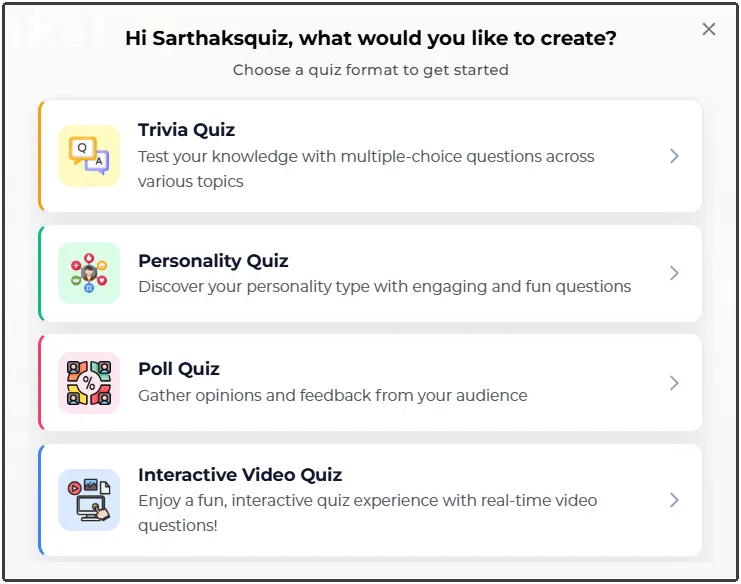
The first step is selecting the type of quiz you want to create. Different quiz formats serve different purposes, so choosing the right one helps create a better experience for your audience. With Quizard, you can create various types of quizzes, including:
Trivia Quizzes
Personality Quizzes
Poll Quizzes
Interactive Quizzes
Whether you're testing knowledge, collecting opinions, or creating engaging content, Quizard offers the flexibility to choose the format that best matches your goals.
Step 2: Add Quiz Details
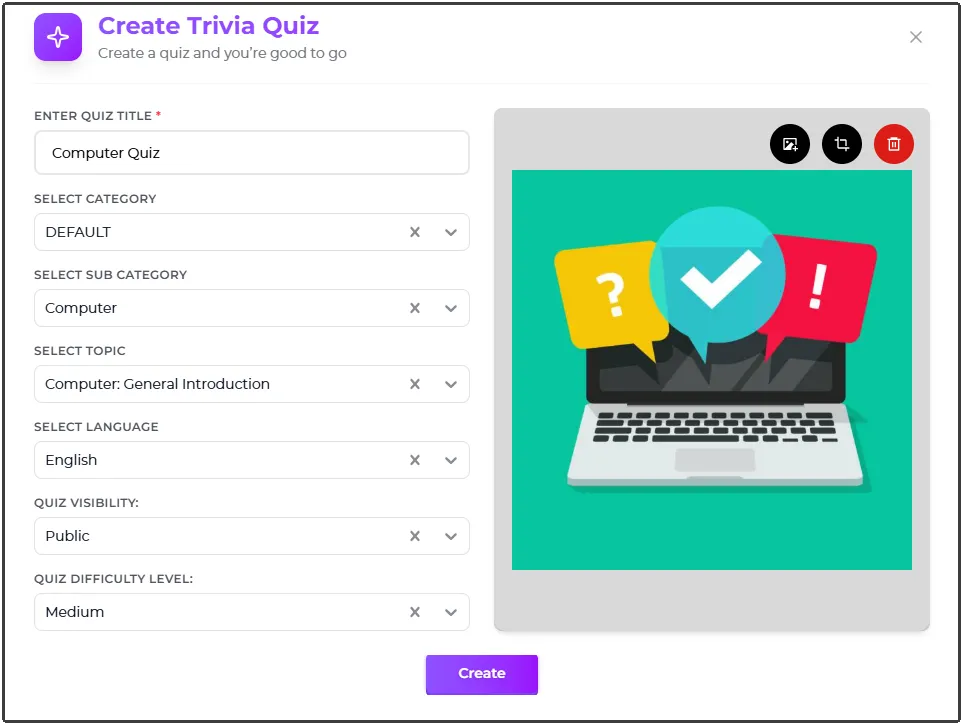
Once you've selected a quiz type, the next step is configuring the basic details of your quiz. Quizard allows you to customize important information such as:
Quiz Title
Quiz Description
Subject Category
Quiz Level
Quiz Language
Quiz Thumbnail
These details help organize your quiz, improve discoverability, and provide participants with important context before they begin.
Step 3: Add Questions
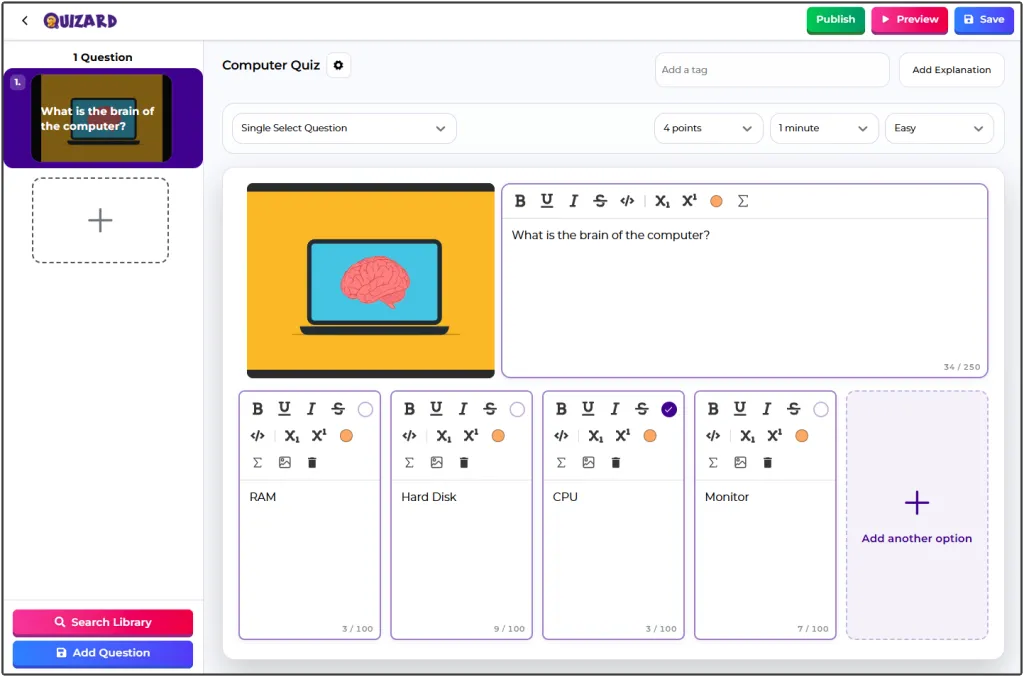
After setting up the quiz information, it's time to create your questions. Quizard supports multiple question formats, allowing you to design quizzes that are both engaging and effective. Depending on your quiz type and objectives, you can choose from different question types and customize answer options accordingly. Adding well-structured questions is one of the most important steps in creating a successful quiz, as it directly impacts participant engagement and quiz quality.
Step 4: Review and Publish
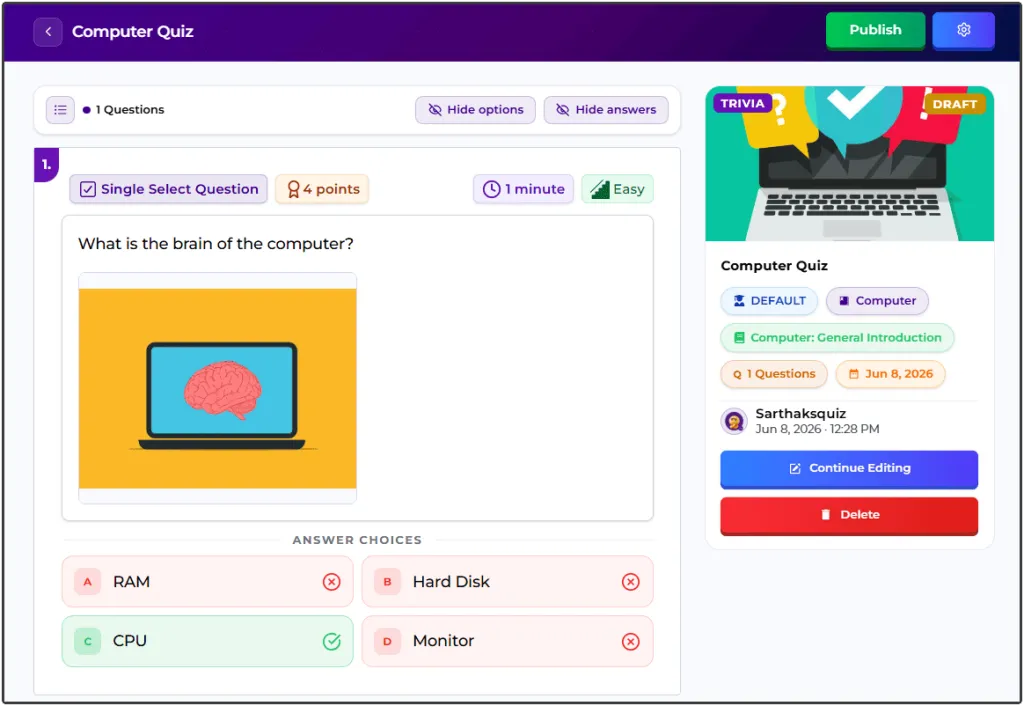
Before making your quiz available to participants, review all quiz settings, questions, and content carefully. This step helps ensure that your quiz is accurate, properly formatted, and ready for your audience. Once everything looks good, you can publish your quiz with a single click.
Step 5: Play and Share
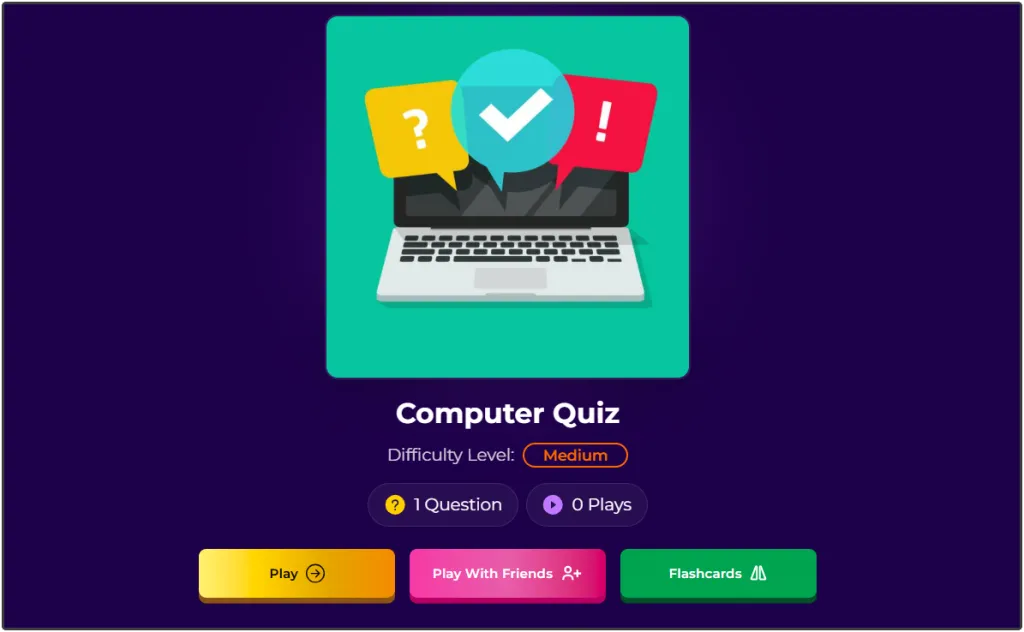
After publishing, your quiz is ready to be experienced by participants. You can play the quiz yourself to test the experience and then share it with students, employees, customers, friends, or your online audience. Quizard makes it easy to distribute quizzes and increase participation through simple sharing options. From quiz creation to audience engagement, the entire process can be completed within minutes using Quizard's Online Quiz Builder.
Tips for Building Better Quizzes
Creating a quiz is easy, but creating an engaging quiz requires thoughtful planning. These simple tips can help you build quizzes that are enjoyable, easy to understand, and more effective for your audience.
Start with a Clear Objective: Decide whether your quiz is meant for learning, training, entertainment, feedback, or audience engagement before you begin creating it.
Choose the Right Quiz Type: Select a trivia quiz, personality quiz, poll quiz, or interactive quiz based on the experience you want to provide.
Know Your Audience: Consider the age, interests, and knowledge level of your participants so you can create questions that are relevant and engaging.
Write Clear and Simple Questions: Use straightforward language and avoid confusing or overly complicated wording to make your quiz easy to follow.
Keep the Quiz Balanced: Include enough questions to achieve your goal without making the quiz feel too long or overwhelming.
Maintain the Right Difficulty Level: Match the difficulty of your questions to your audience to keep participants motivated throughout the quiz.
Use an Attractive Thumbnail and Title: A compelling title and eye-catching thumbnail encourage more people to start your quiz.
Review Before Publishing: Always preview your quiz to check for spelling mistakes, incorrect answers, or formatting issues before sharing it.
Following these best practices will help you create quizzes that are both engaging and enjoyable while improving the overall participant experience.
Common Mistakes to Avoid When Building a Quiz
Even with a powerful Online Quiz Builder, a few common mistakes can reduce the effectiveness of your quiz. Avoiding these issues will help you create quizzes that are more professional and enjoyable.
Starting Without a Goal: Building a quiz without a clear purpose often leads to inconsistent questions and a confusing participant experience.
Adding Too Many Questions: Long quizzes can reduce completion rates. Keep your quiz focused and include only questions that add value.
Using Confusing Language: Questions should be simple, direct, and easy for participants to understand.
Making Every Question Too Difficult: A balanced mix of easy, moderate, and challenging questions keeps participants engaged.
Skipping the Review Process: Publishing without reviewing your quiz can result in spelling mistakes, incorrect answers, or formatting errors.
Ignoring Mobile Users: Since many participants use smartphones, make sure your quiz is easy to complete on all devices.
Choosing the Wrong Quiz Type: Using the appropriate quiz format helps create a better experience and ensures your quiz achieves its intended objective.
By avoiding these common mistakes and following best practices, you can build quizzes that are more engaging, professional, and effective for every audience.
Why Choose Quizard?
Quizard is designed to make quiz creation simple, efficient, and accessible for everyone. Whether you're creating quizzes for education, training, business, marketing, or entertainment, our Online Quiz Builder provides an intuitive experience that helps you build professional quizzes without unnecessary complexity. From choosing a quiz type to publishing and sharing, every step is streamlined to save you time while giving you complete control over your content.
With Quizard, you can Create Your Own Quiz using multiple quiz formats, customize important quiz details, add different question types, and publish engaging quizzes in just a few simple steps. Whether you're building your first quiz or managing quizzes for a larger audience, Quizard provides the flexibility and tools you need to create interactive quiz experiences with confidence.
Ready to create your own quiz? Build engaging quizzes with Quizard today.
Frequently Asked Questions
8 questions answered
An Online Quiz Builder is an online tool that helps users create, customize, publish, and share quizzes without requiring technical skills or coding knowledge.
Simply choose your preferred quiz type, add your quiz details, create questions, review your quiz, publish it, and share it with your audience. The entire process is designed to be quick and easy.
Quizard allows you to create trivia quizzes, personality quizzes, poll quizzes, and interactive quizzes for education, training, business, marketing, and entertainment.
Yes. Quizard lets you personalize your quiz by adding a custom title, description, category, language, difficulty level, thumbnail, and questions.
No. Quizard is built with a user-friendly interface that allows anyone to create professional quizzes without technical expertise.
Yes. You can update your quiz details, questions, and settings whenever needed to keep your content accurate and relevant.
Absolutely. Once your quiz is published, you can easily share it with participants through links, websites, blogs, email, or social media platforms.
Yes. Quizard is suitable for teachers, students, businesses, marketers, trainers, content creators, event organizers, and anyone looking to create engaging online quizzes.