Generate Engaging Quizzes Easily with AI Quiz Generator
Summary:
Discover how Quizard's AI Quiz Generator simplifies quiz creation by turning text, documents, images, YouTube videos, and web links into engaging quizzes. Learn how AI powered quiz generation works, explore its benefits, and create interactive quizzes faster with Quizard.
Creating engaging quizzes often takes more time than expected. From researching a topic and writing meaningful questions to deciding the right difficulty level and reviewing every answer, the process can become repetitive, especially when you're creating quizzes regularly. While traditional methods work, they often require considerable effort to produce high quality results. An AI Quiz Generator offers a smarter approach by automating much of the quiz creation process. Instead of writing every question manually, you can generate a complete quiz from existing content within minutes. This allows educators, businesses, trainers, and content creators to spend less time creating quizzes and more time delivering engaging learning experiences.
At Quizard, we've built an AI Quiz Generator that combines intelligent automation with flexible customization. Whether your content is in the form of text, a document, an image, a YouTube video, or a web page, Quizard AI can transform it into an interactive quiz that is ready to review, publish, and share. If you're looking for a reliable Quiz Generator or a powerful Free Quiz Generator, Quizard AI provides an efficient solution for creating quizzes with ease.
In this guide, you'll learn what an AI Quiz Generator is, why more people are choosing AI for quiz creation, and how Quizard AI helps you generate engaging quizzes in just a few simple steps.
What Is an AI Quiz Generator?
An AI Quiz Generator is a tool that uses artificial intelligence to automatically create quizzes from different types of content. Instead of creating every question manually, you simply provide a source such as text, a document, an image, a YouTube link, or a web link. The AI analyzes the content and generates relevant questions based on the information provided.
Unlike a traditional Quiz Generator, which requires users to prepare each question themselves, an AI powered solution handles the most time consuming part of the process while still allowing you to review, edit, and customize the generated quiz. This makes quiz creation faster, more efficient, and easier to manage without compromising on quality. An AI Quiz Generator can be used for classroom assessments, employee training, online courses, customer engagement, certification programs, and many other applications. Because it automates question generation, it helps users create quizzes more consistently while significantly reducing manual effort.
With Quizard, AI generated quizzes can be customized to match your specific requirements before they are published. This gives you the speed of AI along with the flexibility to ensure every quiz aligns with your learning objectives or business goals.
Why Use an AI Quiz Generator?
As the demand for interactive learning and digital engagement continues to grow, creating quizzes manually is no longer the most efficient approach. An AI Quiz Generator simplifies the process by automatically generating quiz questions from your content, helping you create high quality quizzes in a fraction of the time.
Here are some of the key benefits of using an AI Quiz Generator:
Generate Quizzes Faster: Transform your content into a complete quiz within minutes instead of creating every question from scratch.
Reduce Manual Work: Let AI handle question generation while you focus on reviewing and refining the final quiz.
Improve Productivity: Create more quizzes in less time without sacrificing quality or consistency.
Support Multiple Content Sources: Generate quizzes from text, documents, images, YouTube videos, and web links.
Customize Before Publishing: Adjust quiz type, language, difficulty level, number of questions, images, and question formats to suit your needs.
Create Engaging Learning Experiences: Build quizzes that are interactive, well structured, and suitable for different audiences.
Suitable for Multiple Use Cases: Use AI generated quizzes for education, corporate training, online learning, marketing campaigns, events, and community engagement.
Whether you're an educator preparing assessments or a business looking to improve training programs, a modern Quiz Generator helps you create engaging quizzes more efficiently. With Quizard AI, you can enjoy the convenience of AI powered quiz creation while maintaining complete control over your final content.
How to Generate a Quiz Using Quizard AI
Creating a quiz with Quizard AI is simple and efficient. Instead of spending hours writing questions manually, you can generate a complete quiz from different types of content in just a few steps. Whether you're creating quizzes for education, training, business, or entertainment, Quizard AI helps you transform your content into interactive quizzes with the power of AI.
Step 1: Choose Your Content Source
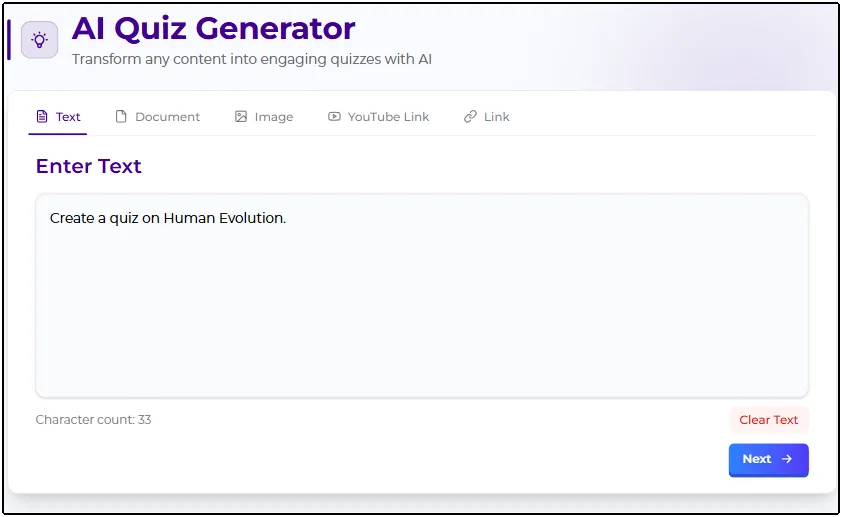
Begin by opening the Quizard AI section in your Quizard dashboard. The first step is selecting the content source you want to use for quiz generation. Quizard AI supports multiple input options, allowing you to generate quizzes from text, documents, images, YouTube links, or web links. This flexibility enables you to create quizzes from study materials, presentations, articles, videos, and many other types of content.
Step 2: Customize Your Quiz
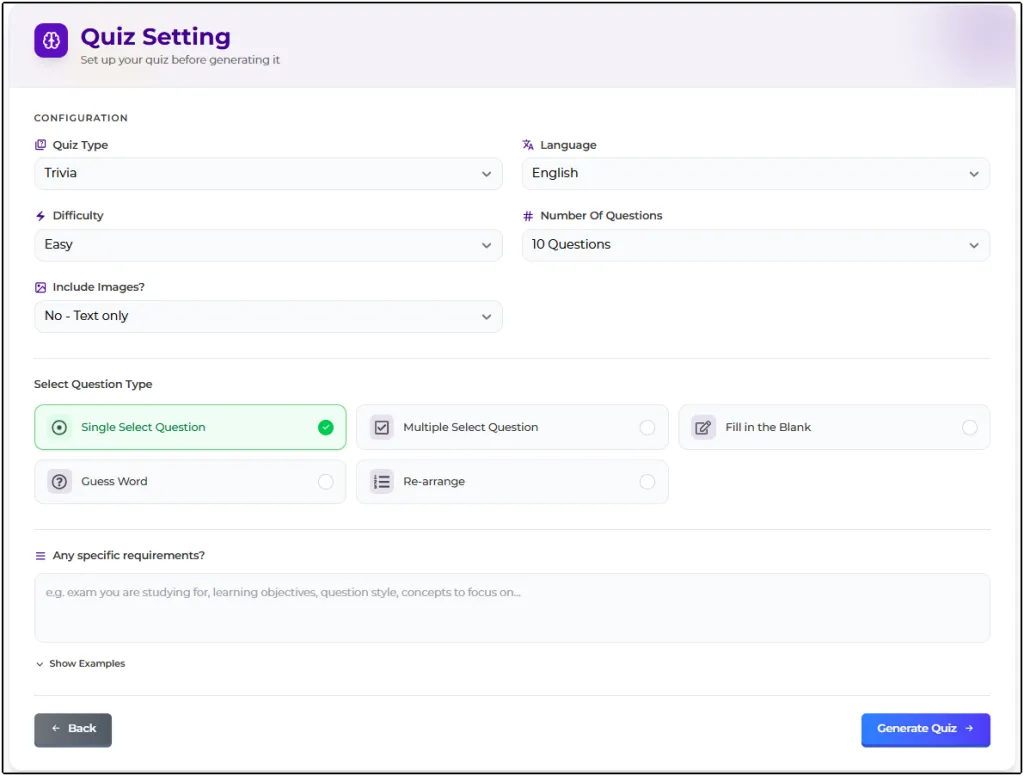
After selecting your content source, configure the quiz according to your requirements. You can choose the quiz type, preferred language, difficulty level, number of questions, and whether images should be included in the generated quiz. Quizard AI also allows you to select the question formats you want to include, such as single select, multiple select, fill in the blanks, guess the word, and rearrange questions. These customization options help ensure the generated quiz matches your objectives and provides the right experience for your audience.
Step 3: Generate Your Quiz with AI
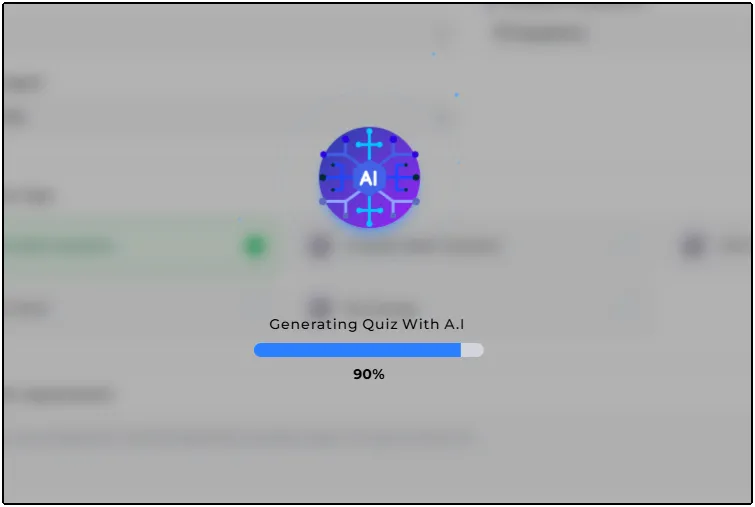
Once you've finished configuring the quiz settings, click the Generate button. Quizard AI instantly analyzes your selected content and generates relevant, well structured questions based on the options you've chosen. This intelligent process significantly reduces the time and effort required to create quizzes while maintaining accuracy and consistency.
Step 4: Review
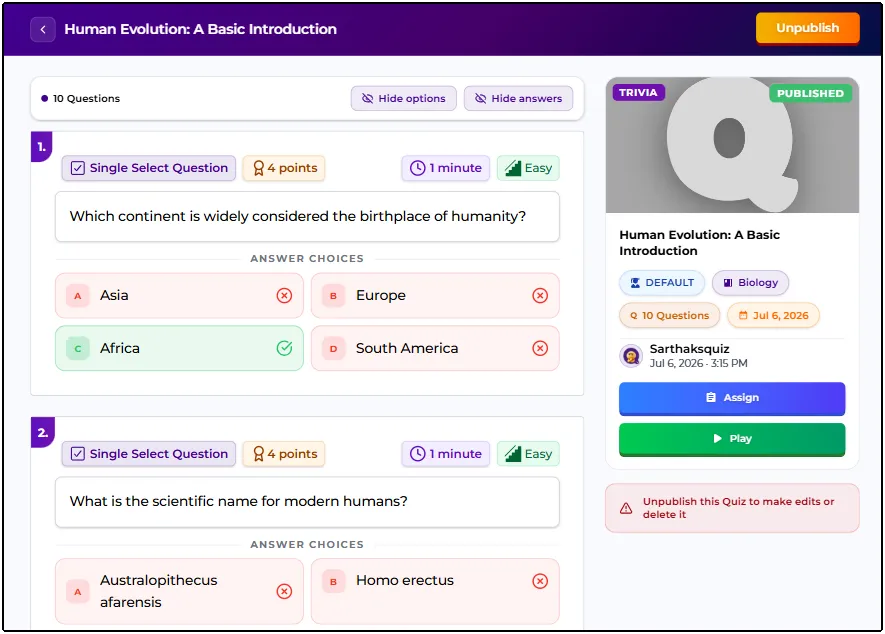
After the quiz has been generated successfully, review the questions and quiz details to ensure everything meets your expectations. If you want to make any changes, simply unpublish the quiz, edit the questions or quiz details, and publish it again once your updates are complete.
Step 5: Play and Share
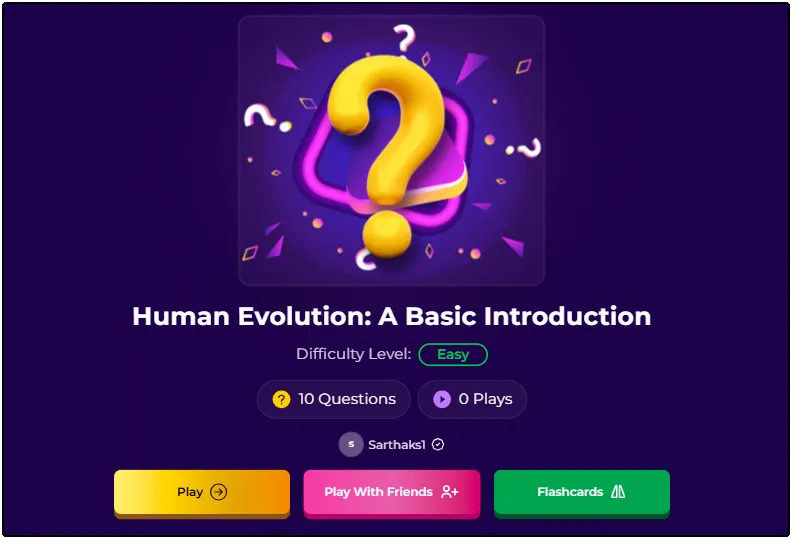
Your AI generated quiz is now ready to use. Preview the quiz to see how participants will experience it, then share it through a direct link or across your preferred platforms. With Quizard's Free Quiz Generator, you can quickly turn almost any type of content into an engaging quiz that is ready to play and easy to share.
Where Can You Use AI Generated Quizzes?
One of the biggest advantages of an AI Quiz Generator is its versatility. Since quizzes can be generated from different types of content, they can be used across a wide range of industries and purposes. Whether your goal is to educate, assess, engage, or entertain, AI generated quizzes help simplify the process while delivering an interactive experience.
Education and Learning
Teachers, schools, and educational institutions can use AI generated quizzes to create classroom assessments, practice tests, homework, and revision activities. Instead of preparing every question manually, educators can quickly convert study materials into interactive quizzes that encourage active learning.
Employee Training
Businesses and organizations can generate quizzes for employee onboarding, compliance training, skill development, and knowledge assessments. AI helps trainers create consistent quizzes that make learning more engaging while reducing preparation time.
Online Courses
Course creators can transform lessons, study notes, and learning resources into quizzes that reinforce key concepts. Adding quizzes throughout an online course helps learners evaluate their understanding and keeps them actively involved in the learning process.
Marketing and Audience Engagement
Interactive quizzes are an effective way to engage audiences and increase participation. Businesses, brands, and marketers can use an AI Quiz Generator to create quizzes that educate customers, promote products, collect feedback, or encourage social sharing.
Events and Communities
Whether you're hosting an online event, webinar, workshop, or community challenge, AI generated quizzes provide a fun way to encourage participation. They can be used for competitions, icebreakers, knowledge checks, or post event engagement.
Tips for Getting the Best Results from an AI Quiz Generator
Although an AI Quiz Generator can generate quizzes within minutes, taking a few extra steps can help you achieve even better results. These best practices ensure your quizzes are accurate, engaging, and aligned with your objectives.
Use High Quality Content: The quality of the generated quiz depends on the quality of the content you provide. Clear and well structured source material produces better questions.
Choose the Right Difficulty Level: Select a difficulty that matches your audience, whether they're beginners, intermediate learners, or advanced users.
Select Suitable Question Types: Different question formats create different learning experiences. Choose the types that best fit your quiz objectives.
Review Every Generated Question: AI speeds up quiz creation, but it's always a good idea to review the generated questions before publishing.
Customize Before Publishing: Edit quiz details, adjust questions if necessary, and personalize the quiz to better match your audience.
Include Images When Needed: Adding images can make quizzes more interactive and improve understanding, especially for visual topics.
Test the Quiz First: Preview your quiz before sharing it to ensure everything works as expected and provides a smooth participant experience.
By combining AI powered generation with thoughtful customization, you can create quizzes that are not only accurate but also engaging, interactive, and enjoyable for your audience.
Why Choose Quizard AI?
Quizard AI makes quiz creation faster, easier, and more efficient. Instead of creating every question manually, you can generate a complete quiz from text, documents, images, YouTube links, or web links in just a few clicks. With flexible quiz settings and multiple question types, you can create quizzes that match your audience and purpose without spending hours on preparation. Quizard AI also gives you the flexibility to customize your quiz before it's generated by selecting the quiz type, language, difficulty level, number of questions, images, and question formats. Once the quiz is generated, it's automatically published and ready to play. If you need to make any changes, simply unpublish the quiz, edit it, and publish it again.
If you're looking for a reliable AI Quiz Generator, an advanced Quiz Generator, or a feature-rich Free Quiz Generator, Quizard AI provides everything you need to create engaging quizzes with confidence.
Frequently Asked Questions
8 questions answered
Quizard AI is the AI-powered quiz generation feature available on Quizard. It helps users generate interactive quizzes from text, documents, images, YouTube links, and web links in just a few simple steps.
Yes. Quizard AI is a Free Quiz Generator, allowing users to experience AI powered quiz creation and generate quizzes quickly from various content sources.
Quizard AI is suitable for teachers, students, trainers, businesses, marketers, content creators, event organizers, and online communities that want to create quizzes quickly and efficiently.
With Quizard AI, users choose a content source, configure quiz settings such as language, difficulty, number of questions, and question types, and then click Generate. The AI analyzes the content and creates a complete quiz automatically.
With Quizard AI, you can generate quizzes from text, documents, images, YouTube links, and web links, making it easy to convert existing content into interactive quizzes.
Quizard AI can generate single select, multiple select, fill in the blanks, guess the word, and rearrange questions, allowing users to create more interactive quiz experiences.
Yes. Before publishing, you can edit questions, update quiz details, choose different question types, adjust the difficulty level, and make other changes to ensure the quiz meets your requirements.
Absolutely. Once Quizard AI generates and publishes your quiz, you can preview it and share it with your audience through a direct link or your preferred online platforms.